Track the work. See where the hours went. Bill for all of it.
Every hour your team works is attached to a project, a client and a task — so you can see where the time went, what is billable, and what is still sitting unbilled. Built for agencies, IT firms and service businesses.
In Progress
Board drag & drop
Invoice PDF export
In Review
Screenshot blur
Done
Activity scoring
Leave approvals
Productivity this week
Recent screenshots
Three things every service business needs to answer
Not “is everyone working”. These three — and until the hours, the work and the rates live in one place, none of them has an honest answer.
The hours were never a mystery
A project runs three weeks past its estimate and nobody can say which weeks. Hours recorded against the project, the client and the task answer that while the work is still running — not once the invoice has already gone out.
An answer, not a guess
When a client asks how it is going, the reply should not be assembled in the meeting. Tasks done, tasks left, hours spent against hours estimated — all from the same record, ready before the call starts.
Find the missing hours
Estimated at forty hours, tracked at seventy-one. The useful question is where the extra thirty-one went — a bad estimate, a scope change, or work that was never on the board at all. Each has a different fix.
From clock‑in to invoice, nothing falls through
Watch the product in five minutes
A short tour of the whole thing — the board your team plans on, the hours behind it, the activity that makes those hours mean something, and the invoice at the end.
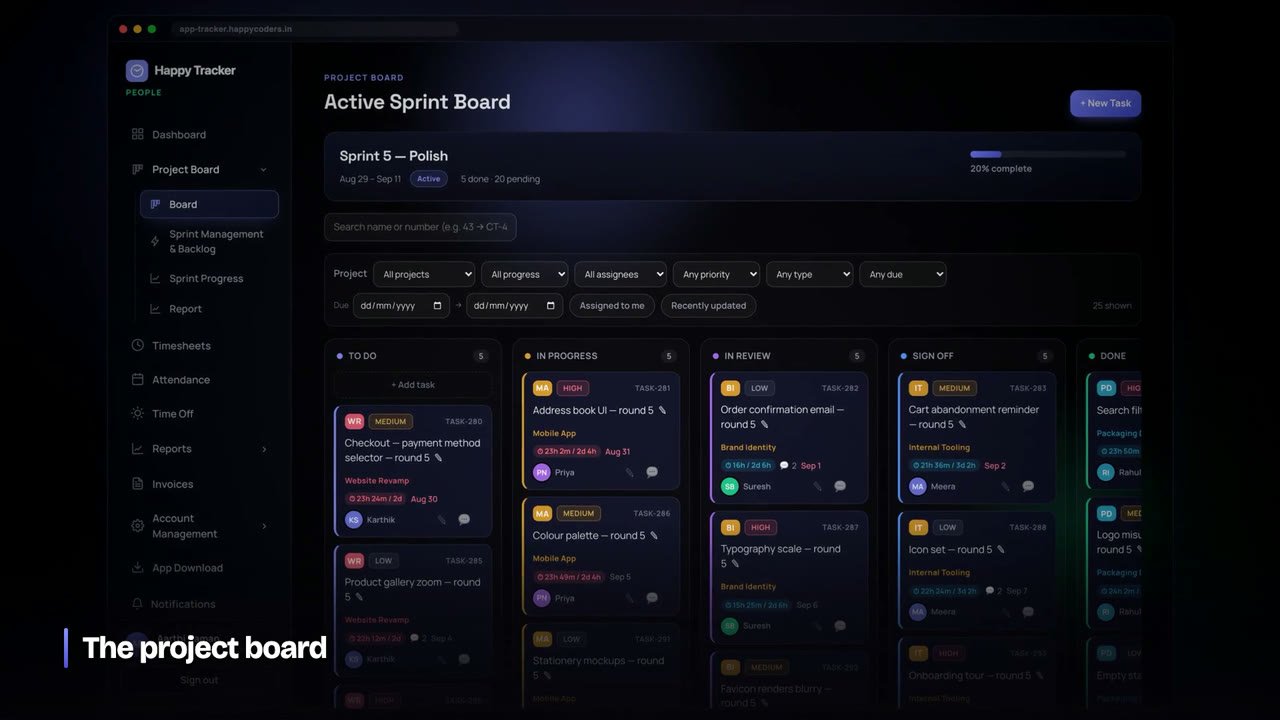
From first clock‑in to invoice, in four steps
Set up in minutes. Everything connects — so time, work and productivity flow into reports and billing automatically.
Create your workspace
Sign up, add your company and invite the team with roles — owner, admin, manager, team member.
Track time
Clock in on the web or the native desktop app, on a project and activity, with breaks handled automatically.
Capture activity
Screenshots and activity blocks are recorded on your schedule, scored, and rolled up to task, project and person.
Report & bill
See delivery and productivity in reports, then generate branded invoices from billable time — download as PDF.
One connected system for time, work & billing
Not five disconnected tools — every part feeds the next, from the board to the timesheet to the invoice.
A focused board that mirrors how your team ships
Plan sprints, manage the backlog, and move work through a clear five‑stage flow. Bulk‑move tickets, set points and priorities, and keep everyone on the active sprint.
- To Do → In Progress → In Review → Sign Off → Done
- Sprint planning, backlog & bulk ticket moves
- Points, priority, labels & assignees
In Progress
Board drag & drop
Bulk move tickets
In Review
Sprint burndown
Done
Backlog reorder
Points rollup
Accurate hours, without the busywork
One‑click clock in/out with automatic breaks, plus daily, weekly and monthly timesheets for the whole team. Managers approve and lock weeks; everything exports for payroll.
- Clock in on web or the desktop tracker
- Manual entries, approvals & week locking
- Payroll‑ready CSV export
Productivity you can actually see — fairly measured
Every few minutes the tracker records the app used and how active the session was, then scores the block. Scores roll up per task, project and person. It counts activity, never keystrokes — and blocks can be reclassified as meeting, break or learning.
- Activity counts only — never keystrokes
- Reclassify a block as meeting / break / learning
- Rolls up to task, project & team member reports
Proof of work, with privacy built in
The desktop tracker captures the screen on a schedule you control — and blurs on‑device before upload when you want it. Images are compressed per plan and auto‑deleted after your retention window to keep storage lean.
- Capture interval you set — every 10 / 5 / 1 min
- On‑device blur & per‑plan resolution
- Thumbnail + full storage, auto‑deleted on retention
From tracked time straight to a paid invoice
See delivery, attendance and productive time in clear reports — then turn billable hours into branded invoices by client or by task, with tax and PDF export. No re‑keying, no spreadsheets.
- Attendance, time & productive‑time reports
- Invoice by client or by task, with tax
- Downloadable PDF invoices & receipts
Productivity measured fairly — not surveillance
Every few minutes Happy Tracker records which app was used and how active the session was, then scores the block and rolls it up to the task, project and person. It counts activity, never keystrokes — and anyone can reclassify a block as a meeting, break or learning. Real signal, without the creep.
Start free to see itEverything a service business needs to run projects
Beyond the headline features, Happy Tracker covers the day‑to‑day essentials your team needs.
Reports & dashboards
Live team dashboards, attendance and productive‑time reports, CSV & print exports.
Invoicing
Generate branded invoices from billable time by client or task, with tax and PDF export.
People & teams
Members, teams, clients and projects with role‑based access and per‑member billable rates.
Time off & holidays
Leave types, requests, approvals and balances, plus a shared company holiday calendar.
Notifications & approvals
In‑app notifications for leave, roles and approvals — everyone stays in the loop.
Audit log & billing
A full audit trail of changes, plan & seat management, add‑on seats and downloadable receipts.
The old way vs Happy Tracker
Stop stitching together a timer, a spreadsheet, a board and a screenshot tool. One system does it all — and the parts actually talk to each other.
✕ Scattered tools
- ✕A timer here, timesheets in a spreadsheet, a board somewhere else — nothing reconciles.
- ✕Screenshots and monitoring live in a separate app with its own login and bill.
- ✕Productivity is a gut feeling — no fair, consistent measure.
- ✕Invoices are re‑typed by hand from exported hours.
- ✕Old screenshots pile up forever and storage costs balloon.
✓ Happy Tracker
- ✓One workspace — time, board, timesheets and billing always in sync.
- ✓Screenshots & activity built in, on a schedule you control per plan.
- ✓Per‑activity productivity scores that roll up to task, project and person.
- ✓Invoices generated straight from billable time — exported to PDF.
- ✓Auto‑delete on retention keeps storage lean, per plan.
Web and native desktop, in sync
Run the whole thing in the browser, and give your team a lightweight desktop tracker — on Mac, Windows or Ubuntu — for accurate background capture.
Web app
Company & team panels in one responsive app — dashboards, boards, timesheets, reports and billing.
macOS
A native menu‑bar app with a floating mini‑timer, background screenshots and Activity Mode.
Windows
The same accurate desktop tracking, screenshots and activity capture for Windows teams.
Ubuntu
Native desktop capture for Linux teams running Ubuntu, with the same background tracking.
Visibility that respects your team
Accountability without surveillance creep. You decide what's captured, it's minimised on‑device, and it doesn't stick around forever.
On‑device blur
Screenshots can be blurred before they ever leave the device.
Counts, not keystrokes
Activity is measured by movement density — never what is typed.
Auto‑delete on retention
Screenshots are pruned automatically on a per‑plan schedule.
Role‑based access
Owners, admins, managers and your team see exactly what they should.
How teams put Happy Tracker to work
However you run your team, there's a workflow that fits — from billing clients to keeping a distributed team accountable.
Bill every hour accurately
Track time against client projects, prove the work with screenshots and reports, then invoice the exact billable hours — no leakage, no guesswork.
Accountability without micromanaging
See who's working, on break or off across time zones. Activity scores and screenshots give managers signal, while blur and counts‑only keep it fair.
Ship sprints, see the effort
Plan sprints, run the five‑stage board, and roll productive time up per task — so delivery and effort are visible together in one place.
Attendance, leave & payroll‑ready hours
Approve timesheets, manage leave and holidays, and export payroll‑ready hours — with an audit trail of every change along the way.
Agencies & studios
Bill clients accurately from tracked hours and prove delivery with reports.
Remote & hybrid
See who's working, on break or off — accountability without micromanaging.
Startups & SMBs
Start free, add seats as you grow, keep time, projects & billing in one tool.
Owners & managers
Live dashboards, approvals and per‑person productivity at a glance.
Built for service businesses
Whether you bill clients by the hour or run a distributed team across time zones, Happy Tracker fits how you already work — and scales as you grow.
Create your workspaceWhat teams get out of it
One source of truth
Time, work and billing stop drifting apart — everything reconciles in one workspace.
Fewer status meetings
Live dashboards and reports answer "where are we?" without another call.
Proof of work
Screenshots and activity give clients and managers confidence — fairly captured.
Faster invoicing
Turn billable hours into a branded PDF invoice in minutes, not hours.
Jump straight into your workspace
Every link opens the app on that page. If you're signed out, you'll log in and land right back here.
Simple, yearly pricing in ₹
One payment per user for the year — no auto‑renewal. Start free, then subscribe from your workspace in a few clicks.
Loading plans…
All plans include time tracking, timesheets, the project board and reports. Screenshots & Activity Mode scale with your plan. Add extra seats any time without changing your plan.
Shipping fast, always improving
Happy Tracker is actively built. Here's what's live today, what's next, and what's on the way.
Activity Mode & scoring
Per‑activity productivity scores that roll up to task, project and person.
Add‑on seats & billing
Buy extra seats without changing your plan; download invoices and receipts.
Two‑image screenshots
Thumbnail + full‑resolution storage with on‑device blur and per‑plan retention.
Windows & Ubuntu trackers
Native desktop capture and Activity Mode on Windows and Ubuntu, too.
Online payments
Pay for plans and extra seats online, right at checkout.
Integrations & API
Connect Happy Tracker to the tools your team already uses.
Start seeing where the work happens
Set up your workspace in minutes. Free to start, no card required — on the web and your desktop.